LevelOpt Examples
Below are examples which go over the LevelOpt workflow setup, post-processing, and results.
Example: GE Bracket Optimization
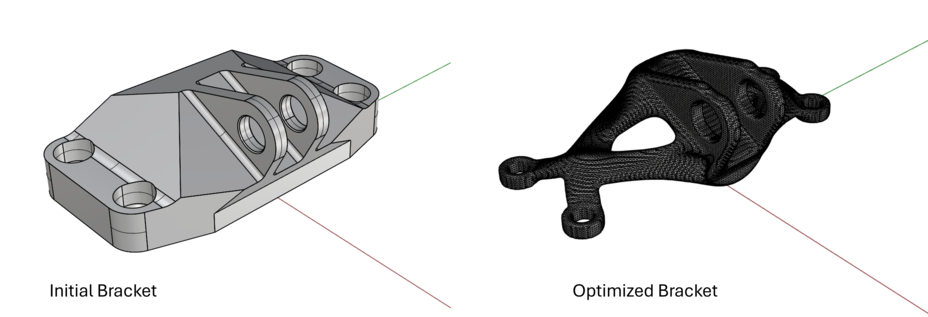
This demo is available for download.
GE Bracket workflow
Run an Intact stress simulation. Follow the Getting Started guide to learn how to run a stress simulation.
specify the component(s) geometry & material
reference the surfaces/meshes and specify inputs for restraints and loads
set the fidelity for the solver via the settings (resolution/cell size)
solve
(optional) visualize quantities such as displacement or von Mises stress
Specify the LevelOpt input parameters:
LevelOpt Advanced Settings block
level set cell size = 0.75
move limit = 1.0
smoothing period = 1
design domain component to optimize (from the stress simulation)
Intact stress simulation output
max iterations = 50 (1 iteration used in video starting from the final iteration for brevity)
volume fraction constraint = 0.25
Solve LevelOpt & post-process
click Solve after all inputs are connected
(optional) visualize velocities/sensitivities
(optional) bake/view final mesh in Rhino
(optional) view iteration log output to see volume fraction and compliance
Example: NASA EXCITE Bracket Assembly
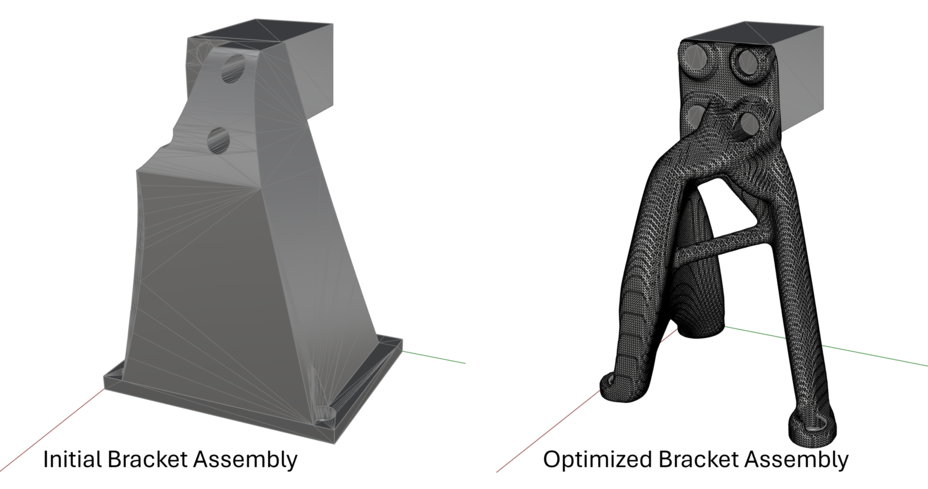
This demo is available for download.
NASA EXCITE Bracket workflow
Run an Intact stress simulation. Follow the Getting Started guide to learn how to run a stress simulation.
specify the component(s) geometry & material
reference the surfaces/meshes and specify inputs for restraints and loads
set the fidelity for the solver via the settings (resolution/cell size)
solve
(optional) visualize quantities such as displacement or von Mises stress
Specify the LevelOpt input parameters:
LevelOpt Advanced Settings block
level set cell size = 0.50
move limit = 1.0
smoothing period = 1
design domain component to optimize (from the stress simulation) note that this corresponds to the bracket geometry component, not the block component to which the load is applied
Intact stress simulation output
max iterations = 100 (1 iteration used in video starting from the final iteration for brevity)
volume fraction constraint = 0.20
Solve LevelOpt & post-process
click Solve` after all inputs are connected
(optional) visualize velocities/sensitivities
(optional) bake/view final mesh in Rhino
(optional) view iteration log output to see volume fraction and compliance