Unit System
The geometry simulated by Intact.Simulation is based on the unit system used in the Rhino document, which can be set in the Rhino file settings. Other input quantities, such as vector loads or pressure loads are based on the Meter Kilogram Second (MKS) unit system by default. The unit system can be changed by right-clicking a block and selecting a different unit system.
Failure to pay heed to the unit system can lead to unexpected and incorrect results.
Choose a different unit system by right-clicking on the block and
selecting the unit system.
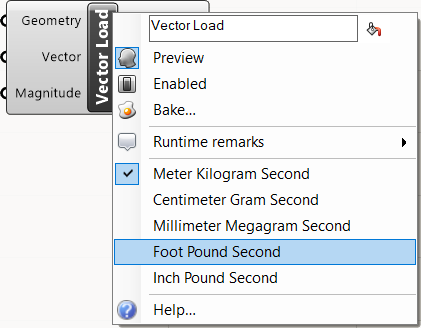
Unit Systems in Intact.Simulation
The default unit system is Meter Kilogram Second (MKS). The supported unit systems are described in the following table:
Analysis units |
Rhino model units |
Mass |
Force |
Stress |
Length |
|---|---|---|---|---|---|
MKS (m kg s) |
meters |
kg |
N |
Pa |
m |
CGS (cm g s) |
centimeters |
g |
dyne |
dyne/cm2 |
cm |
MMS (mm Mg s) |
millimeters |
Mg |
N |
MPa |
mm |
FPS (ft lbf s) |
feet |
slug |
lbf |
lbf/ft2 |
ft |
IPS (in lbf s) |
inches |
lbf s2/in |
lbf |
psi |
in |
Derived Units
Derived units such as acceleration, torque, and density are consistent within each unit system.
Linear acceleration units are length/s2
Torque units are force·length
Density units are mass/length3
Independent Units
Across the several unit systems, rotational units are the same. Namely:
Rotational velocity units are rad/s
Rotational acceleration units are rad/s2